Compare online rent payment systems by cost and fees
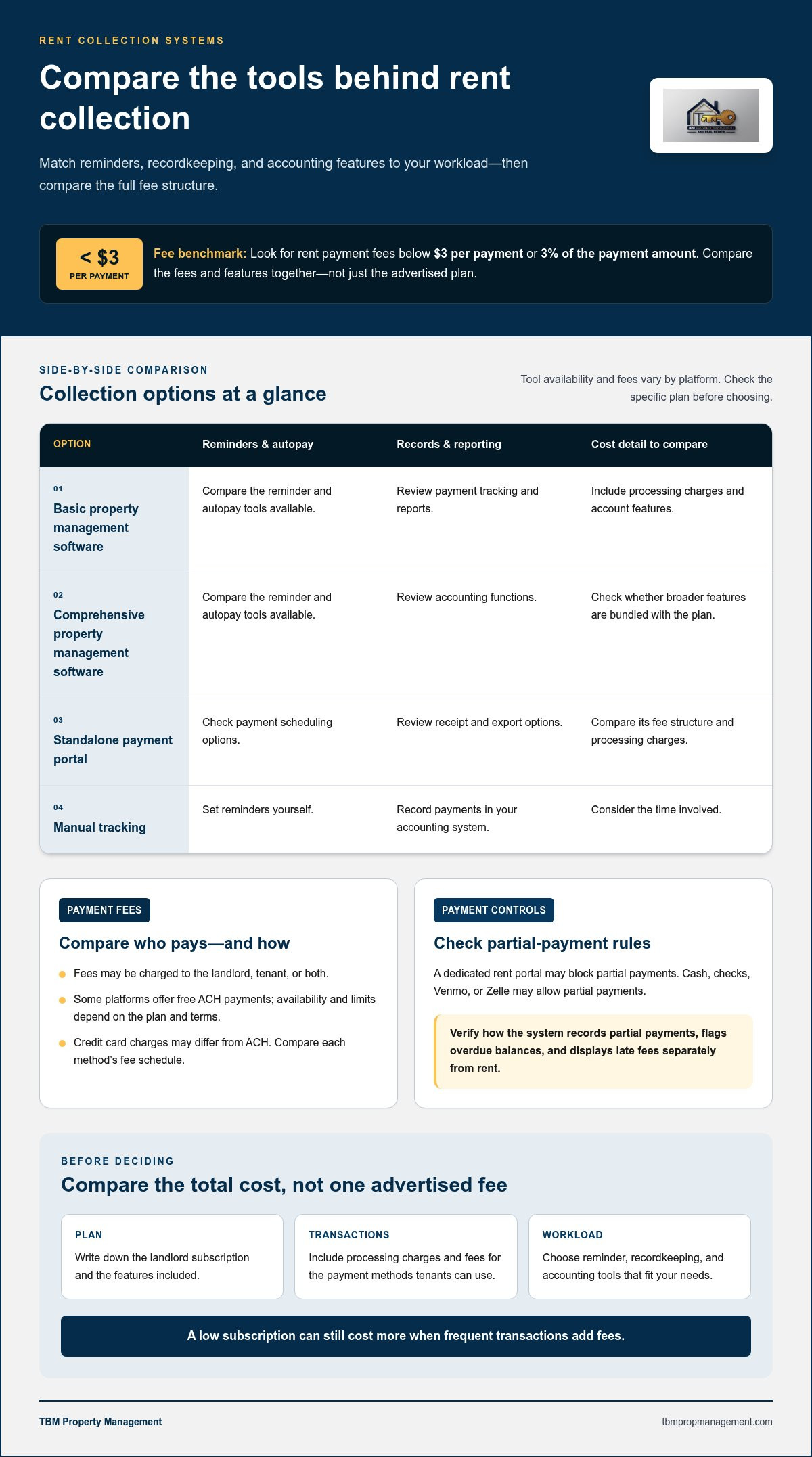
The best online rent payment systems for landlords balance affordable transaction fees with payment methods and tools that fit the size of a portfolio. When comparing options, look for rent payment fees below $3 per payment or 3% of the payment amount, and consider how the system handles partial payments and rent tracking.
Online rent payment systems for landlords can make rent easier to collect and track, but the right choice depends on more than the advertised fee. Consider which payment methods tenants can use, who pays transaction fees, and which features fit your portfolio. This guide covers setup, common payment options, and costs and capabilities for smaller, mid-sized, and larger portfolios, so you can choose a practical approach without paying for tools you don’t need.
Key Takeaways
- Set up reminders, receipts, and clear payment records to make rent collection easier to track.
- Compare how each payment method handles partial payments and who pays transaction fees.
- Match the system’s features to your portfolio size, from basic collection tools to broader management software.
- If rent collection is taking too much time, consider whether professional property management would better support your day-to-day responsibilities.
How do I get started with online rent collection?
Choose a collection method, enter each lease’s rent details, and decide how to track overdue balances. Test the payment and recordkeeping process with one rental before inviting tenants to use it.
For each rental, gather the rent amount, due date, tenant details, and lease terms. Decide whether tenants can schedule recurring payments or pay manually, then set reminders for upcoming due dates. Create a process for tracking overdue balances: review unpaid amounts, record follow-up, and apply late fees only as allowed by the lease and applicable requirements. Make the payment schedule and any fees clear to tenants.
Automated Reminders and Autopay
Automated reminders alert tenants to approaching due dates, while autopay lets them schedule recurring payments through the platform. These features can reduce manual follow-up, but you still need to monitor payments. Check for overdue invoices and failed or missing transactions in your account. For example, set a reminder before rent is due and a separate follow-up task for any balance that remains unpaid afterward.
Receipts, Records, and Reporting
Payment receipts give tenants a transaction record, while your accounting records connect each payment to the right rental. Use financial reports to review collected rent, outstanding balances, and late fees, then organize records for tax reporting. Automated bookkeeping can reduce manual data entry, but check entries for accuracy, especially when one payment covers multiple charges or arrives outside the usual schedule.
| Option | Reminders and autopay | Records and reporting | Cost detail |
|---|---|---|---|
| Basic property management software | Compare available tools | Review tracking and reports | |
| Comprehensive property management software | Compare available tools | Review accounting functions | |
| Standalone payment portal | Check scheduling options | Review receipt and export options | Compare its fee structure |
| Manual tracking | Set reminders yourself | Record payments in your accounting system | Compare the time involved |
Choose an option whose reminder, recordkeeping, and accounting features suit your workload.
Landlord pricing and tenant transaction fees
Compare the landlord subscription, transaction charges, and tenant payment options separately. A low subscription can still cost more if frequent transactions incur additional fees.
Landlord Pricing and App Fees
Rent collection apps may charge landlords a subscription, transaction fees, or both. Compare the total cost, not just the advertised plan: include processing charges, account features, and the number of properties you manage. A plan with fewer tools may suit basic tracking, while broader property management software may bundle accounting features. Write down each charge before deciding.
Tenant Transaction Fees
Payment fees may be charged to the landlord, tenant, or both, depending on the platform and payment method. Some platforms offer free ACH payments, but availability and limits depend on each platform’s plan and terms. Compare the fee schedule for bank transfers, credit card payments, and other options; credit card transactions may carry a different charge than ACH. A useful benchmark is to look for rent payment fees below $3 per payment or 3% of the payment amount.
Late Fees and Partial-Payment Controls
Late-fee and partial-payment settings affect both collections and recordkeeping. A dedicated rent portal may block partial payments, unlike cash, checks, Venmo, or Zelle. This matters if you need to prevent tenants from paying only part of the rent through the system. Check how the platform records partial payments, flags overdue balances, and displays late fees separately from rent.
Rules for Tenant Payment Fees
In the United States, tenant payment fees must be considered alongside lease terms and applicable state and local requirements. No single fee setting suits every tenancy. Distinguish processing charges from late fees in your records, and make the terms clear before rent is due. When comparing online rent collection options, assess fee disclosure, payment methods, and partial-payment controls together rather than choosing based only on a low app fee.
Online rent collection and payment methods
Choose payment methods first, then set up each rental’s charges and reporting. A clear dashboard can help you track rent, deposits, and tenant expenses separately.
Rent, Deposits, and Tenant Expenses
Label monthly rent, deposits, and tenant expenses separately, such as a utility reimbursement listed in the lease. Clear categories help tenants understand charges and make payments easier to reconcile. Before inviting renters, enter each charge and due date, then confirm the dashboard records each category separately. Reports are easier to review when charges aren’t combined into one payment entry.
Payment Methods and App Features
ACH means Automated Clearing House, the network that moves electronic payments between U.S. banks. A rent collection app may also support credit cards or mobile payments, so compare available methods and their fees. About 50% of renters prefer paying rent online; among those renters, 77% cite greater ease and speed than checks or money orders. Compare partial-payment controls, reminders, and payment receipts, too.
Collection Setup and Dashboards
To set up collection, add each rental, enter rent and other charges, then invite tenants to use the platform. Configure due dates and reminders, and test how the dashboard displays paid, pending, and overdue balances. Review reports by rental and charge type, then reconcile them with your accounting records. A well-organized dashboard can help you spot an unpaid deposit without confusing it with monthly rent.
Security and Fraud Protections
Review security features before entering bank or card details. Check whether the rent portal is PCI-compliant and what payment protections it provides. Also look at how it verifies tenant identity, displays transaction status, and records payment history. These checks help you assess safeguards, which are separate from convenience features such as mobile access and automated reminders.
Choosing a rent payment service by portfolio size
Portfolio size helps narrow your options, but reporting, payment methods, and management needs matter too. Compare the monthly plan with the work it can simplify.
What are the best online rent payment systems for landlords in the US? The best fit is a service that matches your number of rentals, payment options, and tracking needs, not necessarily the plan with the most features. Compare options by portfolio size, then focus on the tools you’ll actually use.
| Portfolio | Cost reference | What to prioritize |
|---|---|---|
| Smaller portfolio | Simple rent tracking and clear income reports | |
| Mid-sized portfolio | Connected accounting and consistent reporting | |
| Large portfolio | Scalable workflows and custom reporting |
For a smaller portfolio, start with the tasks that take the most time. If you manage a few rentals, straightforward digital collection and income tracking may matter more than advanced reporting. Compare each monthly plan with its included features, and check whether it supports the payment methods your tenants use, such as ACH or debit card.
As your portfolio grows, disconnected records can make reconciliation harder. Mid-sized and large operations may benefit from software that connects rent collection with accounting and generates reports across properties. Check whether a plan supports your number of rentals and can separate income by property.
Before choosing, list your current needs and likely next steps: number of rentals, payment types, reporting, and bookkeeping. Then compare plans against that list, not against features you won’t use. If coordinating rental operations alongside collection has become a burden, explore full-service property management as another way to organize oversight.
Choose a system that suits your portfolio and supports the payment methods, income tracking, reporting, and bookkeeping you need. Smaller landlords may prioritize straightforward rent collection, while larger portfolios may need connected accounting and scalable reports.
TBM Property Management: Full-Service Property Management
TBM Property Management provides Full-Service Property Management for owners who want help coordinating ongoing rental responsibilities. If choosing a payment platform is only one part of a larger workload, support with leasing and rent collection can bring those tasks together under one management service.
For a vacancy, TBM Property Management’s Tenant Placement and Leasing Services cover finding a tenant and arranging a lease. For an occupied rental, rent collection supports the ongoing task of receiving payments. Choose help based on where you need it, whether filling a vacancy or managing recurring responsibilities across your properties.
To discuss property management support, contact TBM Property Management or visit tbmpropmanagement.com.
Build a rent process that can grow with you
Your rent process should suit your portfolio now and remain manageable as responsibilities change. Choose online rent payment systems for landlords based on how you handle tenant communication, financial records, and day-to-day oversight, not just the payment screen. Note which tasks still need manual follow-up, then consider whether software or hands-on support would address them more directly.
A payment portal can organize transactions, but managing a rental portfolio involves more than processing payments. If those responsibilities are taking time away from other priorities, consider property management support. The right fit should make the workload easier to manage, not add another layer of work.
For a conversation about support with your rental properties, contact TBM Property Management. Take the next step at a pace that feels right and build an approach that supports your goals.
Frequently Asked Questions
How long will it take for online rent payments to be deposited into my account?
The deposit timeline depends on the platform’s processing and your bank’s posting schedule. A payment may show as submitted before it appears as deposited, so distinguish transaction status from the available account balance. For example, a payment made near a weekend or bank holiday may take longer to appear, depending on the bank’s schedule. Track both statuses when reconciling rent.
What are the pros and cons of accepting credit cards for rent?
Credit cards offer tenants a familiar payment option and can make online payments more convenient. The tradeoff is transaction cost: card fees may differ from bank-transfer fees and affect the amount received or the tenant’s total. Compare the platform’s card-fee arrangement with tenants’ payment preferences, then decide whether the added option is worth the fee and accounting work.
What do ACH and NSF mean?
ACH stands for Automated Clearing House, the network that moves electronic payments between U.S. banks. NSF means “non-sufficient funds,” when an account doesn’t have enough available money to cover a payment. For example, an ACH rent payment may be initiated but later returned for insufficient funds. Keep the original transaction and any return clearly identified in your payment records.
What fees should I expect?
Expect possible subscription charges and transaction fees, which vary by plan and payment method. ACH, debit card, and credit card payments may have different fee arrangements, and tenants may pay some charges directly. Compare the full fee schedule with your expected payment mix. Note whether charges apply per property, per transaction, or as a recurring subscription.
What happens if a tenant misses a payment or a payment fails?
A missed or failed payment should appear as unpaid or returned in the platform’s transaction history. Review its status, record the date, and follow up with the tenant using the contact process in your lease or rental records. If a later payment succeeds, reconcile it separately. Keeping each attempt distinct helps prevent a returned transaction from being recorded as collected rent.
What is partial payment blocking and why does it matter?
Partial-payment blocking is a portal setting that prevents a tenant from submitting less than the full amount due. It can help avoid splitting a rent balance across incomplete transactions. For example, when the portal blocks partial payments, a tenant can’t submit only part of the monthly charge through it. Cash, checks, Venmo, and Zelle don’t offer this control.